






- Joined
- Jun 11, 2022
- Messages
- 215,105
- Reaction score
- 1
- Points
- 38
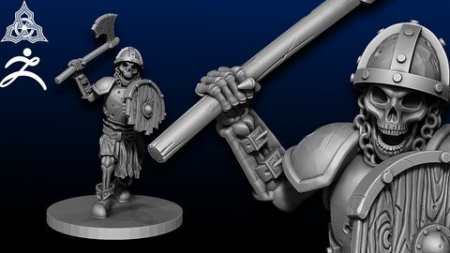
Last updated 3/2020MP4 | Video: h264, 1280x720 | Audio: AAC, 44.1 KHzLanguage: English | Size: 7.86 GB | Duration: 11h 39m
Create an Army of Unique Models
What you'll learn
Learn how to digitally sculpt in the industry leading software: zbrush
Learn how to navigate zbrush
Learn to use many brushes: what each does and when to use them
Learn how to create many various weapons and armors
Learn how to pose your Skeleton Warriors
Learn how to optimize your skeleton for 3d printing
Requirements
Must be able to speak the English Language
Must have a computer with internet access
You will need access to Zbrush free 30 day trial is available for first users
A drawing tablet is highly recommended
Description
Created with the absolute first r in mind, this course will teach you to become proficient in many of Zbrush's more complex features - many of which are unknown to more advanced users.
By the end of this course, you will have the knowledge and skills to create professional-quality 3D models fit for 3D printing and sales. This course builds on our previous course: " Sculpt a 3D printable Skeleton model in Zbrush ", but it is not necessary to have taken that class before this one. This course is completely approachable to a first bner using Zbrush. Join our lead 3D Modeler Josh O'hala as he recreates the exact same skeletal Warrior models that we sell to customers. You will be guided through our professional production pipeline:You will learn how to become comfortable navigating Zbrush.You will learn how to add simple geometry to your project which will be used later. Learn to create many weapons and Armors Learn to create various accessories to bring your Warriors to lifeYou will learn how to use many commonly used brushes as well as specialized brushes to create beautiful and accurate sculpts. The lessons learned will be reinforced as Josh guides you through creating the entire skeleton model. You will learn how to pose your skeleton to create many variations of models. You will learn how to optimize your model for 3D printing.You will learn the process of making your model 3D printable.and much more! visit us on youtube (runeforge studios) for examples of our models and tutorials.
Overview
Section 1: Introduction
Lecture 1 Introduction
Lecture 2 What you'll need
Lecture 3 Before we get started
Section 2: Getting Started and Making a Sword
Lecture 4 Opening Zbrush
Lecture 5 General Navigation
Lecture 6 Using ZModeler / Starting a sword
Lecture 7 Z - Modeler Blade part 2
Lecture 8 Continuing the Sword - Hilt
Lecture 9 Finishing the Base Sword
Section 3: Axe
Lecture 10 Starting the axe
Lecture 11 Finishing the Axe
Section 4: Spear
Lecture 12 Creating the Spear
Section 5: Weathering / Aging weapons
Lecture 13 Weathering weapons - part 1
Lecture 14 Weathering weapons - Part 2
Lecture 15 Finishing the weathered weapons
Section 6: Armor
Lecture 16 Pauldrons
Lecture 17 Helmet
Lecture 18 Bracers
Lecture 19 Breastplate
Lecture 20 Breastplate - part 2
Section 7: Shield
Lecture 21 Shield
Lecture 22 Shield - Part 2
Section 8: Enhancing the Armor and Shield
Lecture 23 Adding straps to the Breastplate
Lecture 24 Aging the Armor
Lecture 25 Breaking the Shield
Section 9: Belts, Boots and Coifs
Lecture 26 Creating a belt
Lecture 27 Creating Boots
Lecture 28 Coif
Section 10: Preparing Melee Warriors for Posing
Lecture 29 Posing hands
Lecture 30 "Equipping Weapons and Shields"
Section 11: Creating Skeletal Archer Assets
Lecture 31 Chainmail part 1
Lecture 32 Chainmail - part 2
Lecture 33 Bow
Lecture 34 Arrows
Lecture 35 Finishing Archer Gear
Section 12: Posing
Lecture 36 Posing - Part 1
Lecture 37 Posing - Part 2
Lecture 38 Posing - Part 3
Lecture 39 The First Pose
Lecture 40 The Second Pose
Lecture 41 The Second Pose - part 2
Lecture 42 Third Pose
Lecture 43 Fourth Pose
Lecture 44 Dynameshing the Poses
Section 13: Preparing for 3D Printing
Lecture 45 Solidifying areas
Lecture 46 Preparing for 3D Printing
Lecture 47 Repairing your Models for 3D Printing
Section 14: Course Wrapup
Lecture 48 Wrapup
This course is intended for anyone who wants to learn how to create professional quality digital sculptures.,This course is intended for anyone who wants to learn how to create their own models for 3D printing.,This course is intended for anyone who wants to learn how to create their own miniatures for tabletop games.
HomePage:
Code:
Https://anonymz.com/https://www.udemy.com/course/sculpt-3d-printable-skeleton-warriors/DOWNLOAD
Code:
https://1dl.net/tc3cnkgz29wg/05LXwowA__Sculpt_3D_.part1.rar.html
https://1dl.net/oqxe3i3uruum/05LXwowA__Sculpt_3D_.part2.rar.html
https://1dl.net/0gw1q9z5rafc/05LXwowA__Sculpt_3D_.part3.rar.html
https://1dl.net/uqxc6ckrf0ri/05LXwowA__Sculpt_3D_.part4.rar.html
https://1dl.net/9k0319fpus4e/05LXwowA__Sculpt_3D_.part5.rar.html
https://1dl.net/z1l09oup1tjz/05LXwowA__Sculpt_3D_.part6.rar.html
https://1dl.net/a73utyh4rs8f/05LXwowA__Sculpt_3D_.part7.rar.html
https://1dl.net/1vdvt3xv0cvd/05LXwowA__Sculpt_3D_.part8.rar.html
Feel free to post your Sculpt 3D Printable Skeleton Warriors In Zbrush Free Download, torrent, subtitles, free download, quality, NFO, Dangerous Sculpt 3D Printable Skeleton Warriors In Zbrush Torrent Download, free premium downloads movie, game, mp3 download, crack, serial, keygen.